Developer Tools●Mid
DocOCR – Convert document images to Markdown locally on macOS
Local Markdown OCR via CLI and HTTP, though macOS Live Text overlaps heavily.
Solve My ProblemCozy
riddleling
4020d ago
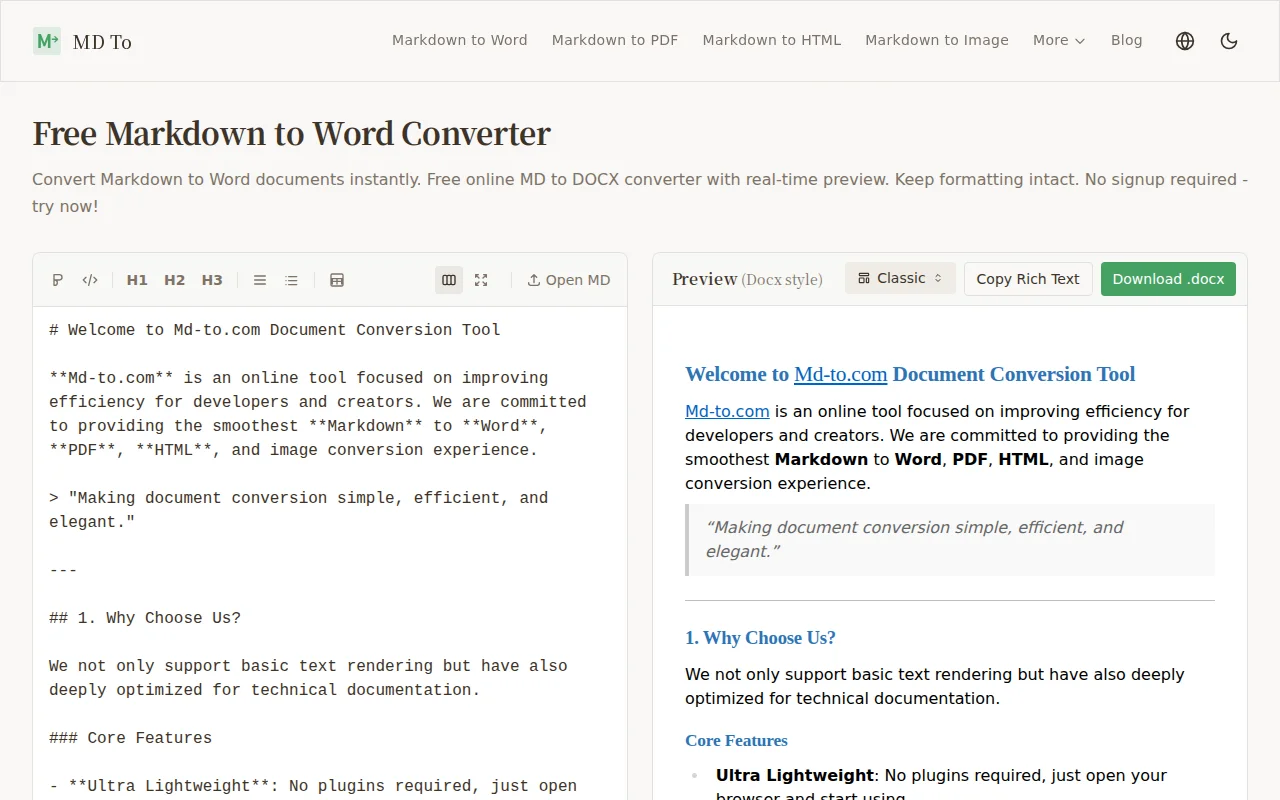
Side-by-side 'Docx style' preview plus a long list of ready templates (Business, Academic, GitHub style, CJK options) makes it immediately useful — you can see exactly how headings, blockquotes and code blocks will appear in Word before you export. The UI feels intentionally minimal: drag/drop, Copy Rich Text and Download .docx are the obvious primary flows. I’d want batch exports, custom template/CSS uploads and editor integrations next; without those this is convenient but not groundbreaking.
Developers, technical writers, content creators, students, and anyone who needs to deliver Markdown content as Word documents for non-technical stakeholders
Goal was simple: Clean UI, fast conversion, and reliable formatting.
Would love to hear what features you'd like to see next (e.g., custom CSS templates or batch processing).
Local Markdown OCR via CLI and HTTP, though macOS Live Text overlaps heavily.
Bidirectional docx-html conversion cuts token usage 2-5x versus Anthropic's built-in skill.
No-browser docs crawler using defuddle when Firecrawl and JinaAI already exist.
No-browser doc crawler when JinaAI and Firecrawl already dominate this space.
Zero-config Markdown→PDF via Typst, but Pandoc already does this with more flexibility.
Obsidian-specific output with wikilinks and frontmatter beats generic markdown converters.