Developer Tools●●Solid
Flompt – Visual prompt builder that decomposes prompts into blocks
Figma for prompts with React Flow—but prompt engineering tools already exist.
Big BrainSolve My ProblemSlick
hkonte
114mo ago
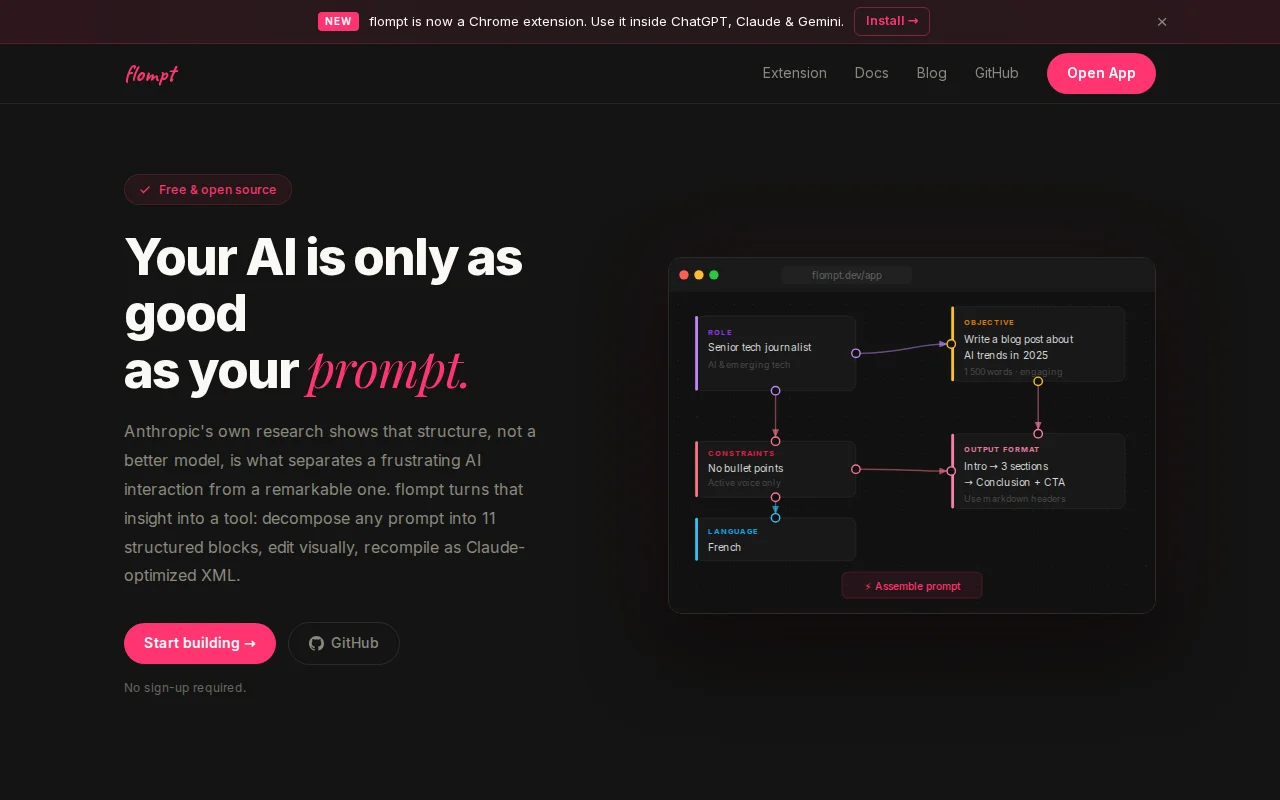
Structured prompt builder with Chrome extension injection and Claude MCP—solves real friction.
AI/LLM power users, prompt engineers, Claude Code users, ChatGPT power users
PromptFlow (Microsoft) · LangChain Prompt Templates · ChatGPT Custom Instructions
If an experienced user couldn't parse it, the model definitely wasn't getting the best version of it either.
So I built flompt. The idea is simple: instead of writing a prompt as a wall of text, you decompose it into typed visual blocks (role, context, objective, constraints, examples, output format), arrange them, and compile to a structured format optimized for the model you're targeting. Claude gets XML, ChatGPT and Gemini get Markdown, each formatted the way the model actually processes it best.
It also ships as a Claude Code MCP so you can build and inject structured prompts directly from your editor, and as a Chrome extension that puts it as a sidebar inside ChatGPT, Claude and Gemini.
A few things I cared about: - Assembly is 100% local, nothing leaves your browser during compile - No account required - You can paste a rough idea and let the AI decompose it into blocks automatically
Try it: https://flompt.dev/app Chrome extension: https://chromewebstore.google.com/detail/mbobfapnkflkbcflmed...
Figma for prompts with React Flow—but prompt engineering tools already exist.
Blockly-based prompt editor beats text-only alternatives, but prompt builders already exist.
The block metaphor and live compiled preview are honest, practical improvements for anyone wrestling with long, conditional prompts — toggles for A/B testing and global {{vars}} are especially handy. Multi-model execution and editable response panes show the author thought about iteration and comparison, but the screenshot feels safe and functional rather than boldly new; I want to know how it handles collaboration, exports, and model/credit management.
Forces LLMs to test mathematical invariants instead of just happy-path examples.
Workflow canvas for AI tasks, but ComfyUI and Zapier already solve this space.
Decision-first prompt framework with reliability checks, but Windows-only v1 limits reach.