Productivity●●Solid
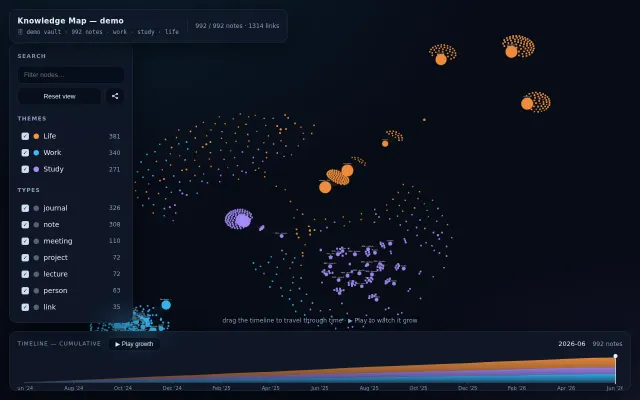
Visualize an Obsidian/gbrain vault as an interactive graph and timeline
Timeline scrubbing shows your knowledge graph grow, unlike Obsidian's static view.
Eye CandyCozyNiche Gem
v_ignatyev
314d ago
Connects genes to diseases using HPO and PDB data in one graph view.
Biomedical researchers and data scientists
Benchling · Cytoscape · STRING DB
The main underlying motive behind this work is to unify all life-science knowledge currently sitting on isolated silos. So...
Biovista Vizit is a knowledge (force directed) graph exploration platform that integrates data from various heterogeneous biomedical resources. By overlaying structured biomedical datasets with literature evidence, Vizit empowers researchers to explore genes, diseases, pathways, and clinical outcomes through an intuitive interactive graph. For each connection, multi-modal supporting evidence is provided, linking back to the original biomedical corpus, like MEDLINE, Human Phenotype Ontology (HPO), Protein Data Bank (PDB), Adverse Outcome Pathway (AOP), and ClinicalTrials.gov.
A big effort in integrating these disparate data sources went into systematically handling the fragmentation problem created by multiple synonyms, typos and generally unstructured input text fields. We now have a procedure to integrate other public biomedical data sources (e.g. USPTO, FDA AERS) or private in house data into the system. Each one comes with its own challenges of course.
You can save and share your created graphs at any point by clicking on the "Save" button.
You can start exploring by clicking on the red "Start" circle.
Feedback and comments are welcome.
Timeline scrubbing shows your knowledge graph grow, unlike Obsidian's static view.
WebGPU force-directed graphs, but Sigma.js, Cytoscape, and D3 already dominate this space.
Commits as force graphs over time. Hypnotic but missing actual insights: why branches diverge, merge velocity.
Captures Toulmin argument structure for decisions when most tools just store flat facts.
Smart frame filtering plus knowledge graph extraction—useful but Fireflies.ai and Otter.ai exist.
Pretty visualization but YouTube discovery is already solved by the platform itself.