Security●●Solid
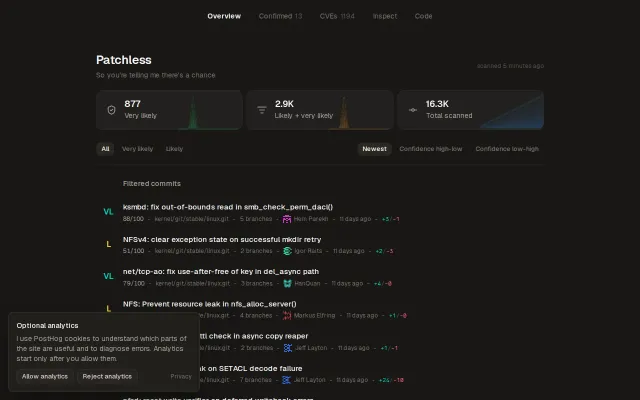
Filtering engine and DB for unpropagated kernel security patches
Finds critical kernel CVEs that stable branches missed, with confidence scores.
Niche GemBig Brain
imbobbytables
2011d ago
Revives 2010 MacBook Pro sleep mode with custom Nouveau driver patches for Gentoo Linux.
Linux enthusiasts maintaining legacy Apple hardware
Coreboot · Linux-libre · Tuxedo Computers
It landed me with a usable KDE environment with acceleration, but sleep mode resulted in an unrecoverable system without a reboot and the graphics driver had oddities like garbled screens during login and occasionally crashing the system if I opened the wifi settings. At the time I tried switching to older proprietary nvidia drivers and some other possible solutions for sleep issues, including asking an older GPT model at some point to investigate the system, but they were dead ends - it seemed to simply be an issue of unsupported old hardware, and I don't have the time to learn driver dev.
But when 5.6 Sol came out and I tried it on Ultra, I was struck by how capable it seemed, so I figured I had nothing to lose throwing it at fixing my system by any means necessary - worst case I would reinstall.
It did its work and went through a series of reboots, asking me to come back with what happened and occasionally do things like test physically closing the lid. I only had to hard-power off one failed kernel launch (which was initiated in some way that GRUB defaulted back to the old proven kernel on successive boots).
After a few hours of this, I found myself with fully working graphics and power states, with some nice bonuses like the time to sleep optimized near the 10 second warning limit (it wanted to keep going but I wasn't too worried about it) and the power options exposed properly to the KDE battery app.
I don't have the kernel dev background or time to learn it to audit all of this myself to submit patches to the kernel, but anyone who does is free to do so. I hope it can help someone else with the same era hardware.
Finds critical kernel CVEs that stable branches missed, with confidence scores.
Reverse-engineered USB protocol in 24hrs; $30 BLE sniffer now works on Linux.
Kernel-level agent sandboxing via eBPF, but alpha code with kernel panics and unproven reliability.
ChatGPT Pro fork of Ralph loop, but Copilot, Cursor, Continue already do this better.
Agent-aware sleep prevention beats manual caffeine tools for long-running CLI tasks.
Ralph fork for ChatGPT Pro instead of Claude, but requires prd.json boilerplate.